
<- Go Back
Global SEO Settings
Using AI to Generate Meta Tags in RankFrame
RankFrame's Write with AI button generates keyword-rich meta titles and descriptions in seconds. The output quality depends on how well you set up Personalization.
Last Updated on
Read Time
3 min read
What Write with AI does

The Write with AI button appears next to your meta title and description fields in the Basic tab. Click it to generate a fresh, keyword-rich version for your Framer page in seconds.
The AI is not a generic ChatGPT prompt. It is tuned for SEO copywriting and uses your Personalization data as its context: your brand name, brand description, goals, target audience, and industry. This means the output sounds like your brand, not a template.
Write with AI is unlimited. Regenerate as many times as you like until the output is right.
Before generating: set up Personalization
AI quality is directly tied to the quality of your Personalization data. Open Account Settings and fill in at minimum:
Brand Name: what to call your business in the output
Brand About: what you do, who you serve, and what makes you different
Main Goals: are you trying to drive traffic, generate leads, or build authority?
Audience: who is the content written for?
Without Personalization, AI falls back to generic copy. With it, the output is specific, on-brand, and ready to use with minimal editing.
Generating a meta title with AI
Open Global Settings, Basic tab (or open any page in the Pages section)
Click Write with AI next to the Meta Title field
The AI generates a title based on your Personalization context and the current page
Review the output. If you like it, save. If not, click Write with AI again to regenerate
AI titles follow the recommended format: primary keyword or value statement, followed by a brand identifier. Keep the result under 70 characters for best search display.
Generating a meta description with AI
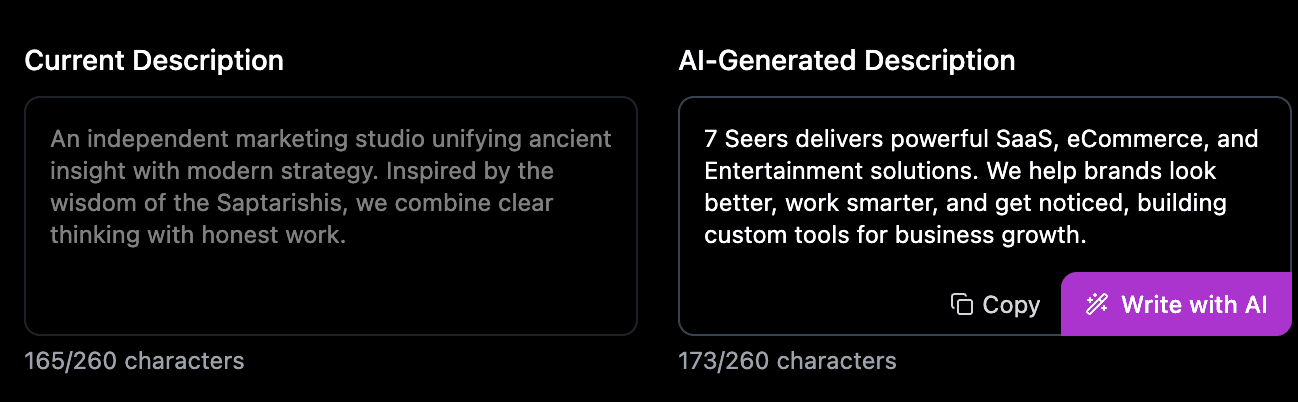
Click Write with AI next to the Meta Description field
The AI generates a description that summarizes the page content and includes a call to action
Review the output. Edit it if needed, or regenerate for a different angle
AI descriptions aim for 150 to 160 characters. Descriptions are the first thing users read after your title in search results. Write for the user, not just the algorithm.
Frequently asked questions
Does Write with AI use credits?
No. Write with AI for meta titles and descriptions is completely unlimited. Generate and regenerate as many times as you want at no extra cost. Only image alt text generation uses AI credits.
Related to