
<- Go Back
Global SEO Settings
Managing Focus Keywords for Your Framer Site
Focus keywords tell RankFrame which terms each page is optimizing for. This article explains the Global Keywords tab, the Focus Keyword Script, and how to assign keywords to specific pages.
Last Updated on
Read Time
3 min read
What a focus keyword is
A focus keyword is the primary search term you want a specific page to rank for on Google.
For example, your homepage might focus on "framer seo plugin" while your pricing page focuses on "framer seo plugin price" and your blog post about schema focuses on "how to add schema to framer".
One keyword per page. Trying to rank one page for many unrelated keywords dilutes your signal. RankFrame enforces this by letting you assign exactly one focus keyword per page.
How keyword injection works
RankFrame injects your focus keyword into each page's <meta name="keywords"> tag. While Google officially ignores this tag for ranking, other search engines (Bing, DuckDuckGo) still read it. The keyword data also feeds into RankFrame's Search Console Keyword Tracker, where it appears as your tracked term.
The injection script must be turned on for keywords to be applied. Toggle it using the Enable Focus Keywords switch at the top of the Global Keywords tab, then republish your Framer site.
Assigning focus keywords to pages
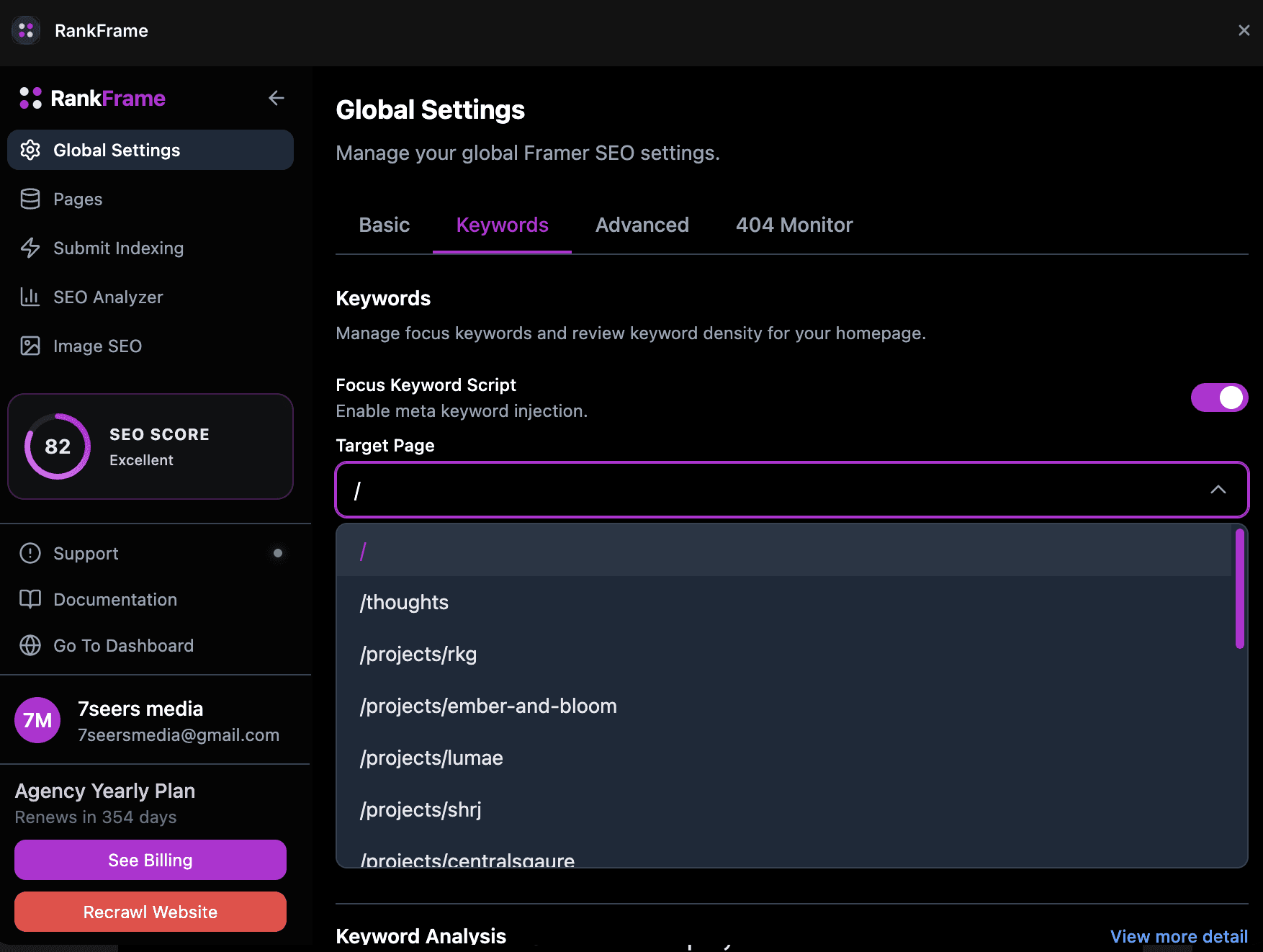
Open Global Settings and click the Keywords tab
Below the keyword list, you will see a Target Page dropdown. Click it to see all pages from your sitemap
Select the page you want to assign a keyword to
Type the focus keyword in the keyword input field
Click Add Keyword to save the assignment
The keyword appears in your saved list with the assigned page URL next to it. You can edit or delete any keyword from the list.
Start with your top 10 most important pages. Assign one strong keyword to each. Then move to secondary pages. This is more effective than trying to cover your entire sitemap at once.
Keyword lookup: volume, difficulty, and CPC
Before assigning a keyword, you can research it directly inside RankFrame. Type the keyword into the search field above the keyword list and click Search.
RankFrame returns real data from the keyword database: monthly Search Volume, Keyword Difficulty (KD), Competition score, and CPC (Cost Per Click). These four metrics help you evaluate whether a keyword is worth targeting.
See Keyword Metrics Explained for a detailed breakdown of each metric and how to use them to make targeting decisions.
Saving and publishing
After assigning your keywords, make sure the Enable Focus Keywords toggle is on
Click Save
Republish your Framer site to apply the keyword meta tags to your live pages
Frequently asked questions
What is a focus keyword in RankFrame?
A focus keyword is the primary search term you want a specific page to rank for. RankFrame stores focus keywords per page so you can track and optimize each page individually.
Related to