8 min read
Schema Markup
What is JSON-LD? Structured Data Format Explained (2026)
JSON-LD is the format Google recommends for structured data. It lives in a script block in the page head, so it never touches your layout. Here's how to use it.

Team 7 Seers
What is JSON-LD? Structured Data Format Explained (2026)
What JSON-LD actually is
JSON-LD is a W3C standard published in 2014 that combines two things: the readability of JSON (the format every web developer already uses) and the semantic power of Linked Data (a way of describing things and the relationships between them so machines can understand them).
In practice, JSON-LD looks like this on a webpage:
That single block tells a search engine: “this page contains an Article, its headline is ‘Hello world’, and it was written by a Person named Jane Doe.” The visitor sees nothing different. The search engine sees a clean fact pattern it can store in its index.
JSON-LD is format-agnostic about vocabulary. You can use it with any Linked Data vocabulary, but in SEO it is almost always paired with schema.org, the shared vocabulary maintained by Google, Bing, Yahoo, and Yandex.
Why Google recommends JSON-LD
Google supports three structured data formats: JSON-LD, Microdata, and RDFa. Since 2015, official Google documentation has explicitly preferred JSON-LD. Here is why.
It is decoupled from your HTML
Microdata wraps your visible content in extra attributes (itemscope, itemtype, itemprop). If your designer changes the page layout, your structured data breaks. JSON-LD lives in a separate script tag, so you can redesign the visible page without touching the markup.
It is easier to generate at scale
Server-side templates, CMS plugins, and JavaScript frameworks can output a single JSON-LD block per page far more reliably than they can sprinkle Microdata attributes across deeply nested HTML.
It is easier to read and debug
JSON-LD reads like a clean JSON object. Microdata reads like obfuscated HTML. When something breaks, JSON-LD is faster to diagnose.
It supports nested and linked entities cleanly
You can describe a Product that has a Brand that has an Organization, all nested in one JSON object, with no awkward HTML wrapping.
Google’s official position
From Google Search Central: “Although we recommend using JSON-LD, you can also use microdata or RDFa.” JSON-LD is the only format Google highlights in its rich result examples and developer guides.
Anatomy of a JSON-LD block
Every JSON-LD block for SEO has the same basic shape. Understanding the four core pieces makes the rest trivial.
1. The script tag
2. @context
3. @type
4. Properties
6 real JSON-LD examples you can copy
Below are six production-ready blocks. Replace the placeholder values and paste them into your site.
1. Organization
“https://twitter.com/acme”,
“https://www.linkedin.com/company/acme”
2. Article
3. Product
4. FAQPage
5. BreadcrumbList
6. LocalBusiness
}]
Where to place JSON-LD in HTML
Google supports JSON-LD in either the <head> or the <body>. There is no ranking difference between the two. In practice:
Site-wide schemas (Organization, WebSite) typically go in the
<head>via a global template or custom code field.Page-specific schemas (Article, Product, FAQPage) can go in either, but the
<head>is conventional.Dynamic JavaScript-injected schemas often end up in the
<body>because they are appended after page render. Google’s renderer will still pick them up, as long as it can execute the JS.
You can have multiple JSON-LD blocks on the same page. Most well-optimized article pages have at least three: Organization, BreadcrumbList, and Article.
How to validate JSON-LD
Google’s Rich Results Test
Go to search.google.com/test/rich-results. Enter a URL or paste your code. The tool fetches and renders the page exactly as Googlebot would, lists every detected schema, and flags errors and warnings. This is the only validator that reflects what Google itself accepts.
Schema.org Validator
Go to validator.schema.org. This tool is stricter on vocabulary correctness and supports schema types Google does not yet display rich results for. Useful for Person, Service, Book, and other types that AI engines still consume.
Google Search Console
After publishing, monitor “Enhancements” in Search Console. Google reports rich result eligibility, errors, impressions, and clicks per schema type. This is the only way to confirm your JSON-LD is working in production at scale.
JSON-LD vs Microdata vs RDFa
Feature | JSON-LD | Microdata | RDFa |
|---|---|---|---|
Location | Separate script block | Inline HTML attributes | Inline HTML attributes |
Couples to design? | No | Yes | Yes |
Readability | High (clean JSON) | Low (verbose attributes) | Low (verbose attributes) |
Google preference | Recommended | Supported | Supported |
Common usage in 2026 | ~95% of new sites | Legacy ecommerce | Government, academia |
Easy to generate dynamically | Yes | Painful | Painful |
Common JSON-LD errors
Invalid JSON syntax
A trailing comma, a missing quote, or an unescaped special character will silently break the entire block. Always paste your JSON into a validator (or jsonlint.com) before publishing.
Missing required properties
Each schema type has required properties for rich results. An Article without headline, image, datePublished, and author will validate but earn no rich result.
Wrong @context URL
Use https://schema.org, not http://, not schema.org alone, not a typo. Wrong context means zero properties resolve.
Mismatched content
If your JSON-LD says the price is $49 but the visible page shows $79, Google can issue a manual action for misleading structured data. The schema must reflect the page.
Duplicated blocks
Two Organization blocks with conflicting properties confuse Google’s entity resolution. Audit periodically, especially after switching plugins or themes.
Stale dates
Hard-coded datePublished or dateModified values that never change can suppress freshness signals and disqualify Top Stories eligibility.
Escaping HTML inside JSON
If your answer text contains quotes or < characters, escape them properly (\") or the block will break parsing.
A short history of JSON-LD
Understanding why JSON-LD became dominant helps explain why Google now treats it as the default. The format was first proposed in 2010 by Manu Sporny as a way to make linked data approachable for everyday web developers, who were intimidated by the verbose RDF/XML and Turtle syntaxes used in the academic Semantic Web community. The W3C ratified JSON-LD as a recommendation in January 2014. Schema.org added official JSON-LD support shortly after.
In 2015, Google quietly began preferring JSON-LD in its developer documentation and rich result examples. By 2017, every new schema type Google launched (Job Posting, Course, Dataset, FAQ) was documented in JSON-LD only. By 2020, the ecosystem had decisively shifted: virtually every major SEO plugin, headless CMS, and ecommerce platform now generates JSON-LD by default. Microdata is still supported for backward compatibility, but it is effectively legacy.
JSON-LD and AI engines in 2026
JSON-LD has taken on a second life beyond traditional SEO. Generative AI engines (ChatGPT Search, Perplexity, Claude’s web tools, Bing Copilot, Google AI Overviews) all crawl the open web and extract facts to cite in their answers. When these engines encounter a page, they look for high-confidence signals about what the page is about. JSON-LD provides exactly that.
An Article block with a clear
authoranddatePublishedis more likely to be cited than a page where the AI must infer those values from prose.An Organization block with
sameAslinks to LinkedIn and Wikipedia gives an AI strong identity confirmation, raising the likelihood it will treat your brand as the canonical source.A Product block with explicit
price,availability, andaggregateRatinggives shopping-focused AI agents a clean fact pattern to surface.
In short: in 2026, JSON-LD is no longer just for Google’s blue links. It is the data layer that determines whether your brand shows up in AI conversations.
Advanced JSON-LD techniques
Using @id to link entities across blocks
If you have multiple JSON-LD blocks on a page (Organization, Article, BreadcrumbList), you can link them by giving each entity a unique @id and referencing it elsewhere. For example, your Article’s publisher property can point to the same @id as your Organization block, telling Google these are the same entity, not two duplicates.
Using @graph to combine multiple entities
Instead of multiple <script> tags, you can declare one block with an @graph array containing every entity on the page. This is a popular pattern in WordPress SEO plugins because it is easier to manage programmatically.
Conditional injection for dynamic CMSes
If you build templates in React, Next.js, or any modern framework, render JSON-LD server-side using the page’s data. Avoid generating it client-side only, since some crawlers (especially older ones and certain AI agents) do not execute JavaScript reliably.
JSON-LD patterns by site type
Different kinds of websites benefit from different schema combinations. Below is a quick reference for the JSON-LD setup that experienced SEOs deploy on each common site archetype.
SaaS marketing site
Use Organization on every page (via global head injection), WebSite with sitelinks search box on the homepage, BreadcrumbList on every inner page, SoftwareApplication on the product page (with applicationCategory, operatingSystem, and offers), and Article schema on every blog post. Add Person schema to author bios. This combination consistently improves brand SERP appearance and AI Overview citations for “what is X” and “best X for Y” queries.
Ecommerce store
Organization plus WebSite site-wide, Product on every product detail page (with offers, aggregateRating, and review), BreadcrumbList on category and product pages, and ItemList on collection pages. If you are large enough, add Sitelinks Search Box markup so users can search your catalog directly from Google.
Local service business
The most specific applicable LocalBusiness subtype (Restaurant, Plumber, Dentist, etc.) on the homepage and contact page, with full address, geo, telephone, openingHoursSpecification, and priceRange. Add Service schema for each individual service you offer. This is the single biggest lever for local pack visibility.
Content publisher or blog
Organization plus WebSite site-wide, NewsArticle or BlogPosting on every article (with full author, publisher, datePublished, dateModified, and image), BreadcrumbList on every page, and Person schema on author profile pages. Pages aiming for Top Stories must use NewsArticle, not generic Article.
Personal portfolio or freelancer
Person schema on the homepage (with jobTitle, knowsAbout, sameAs linking to LinkedIn, GitHub, Twitter), Service schema for each offering, and Article on any blog posts. This setup helps Google understand you as a real entity and is the foundation of a personal Knowledge Panel.
JSON-LD best practices checklist
Always use
"@context": "https://schema.org"with the https prefix.Pick the most specific applicable @type. Use Restaurant, not LocalBusiness, if you run a restaurant.
Make sure every required property for your chosen rich result is present.
Schema must match visible page content. Never mark up data the user cannot see.
Use
@idto deduplicate entities across multiple blocks on the same page.Validate every new schema in the Rich Results Test before publishing.
Monitor Search Console Enhancements weekly for errors and warnings.
Keep
dateModifiedcurrent when you genuinely update content.For ecommerce, sync Product schema with your Merchant Center feed.
Avoid third-party generators that produce bloated or invalid JSON. Stick with audited tools.
If You Have a Framer Site
Framer does not generate any JSON-LD natively. The platform handles meta titles, descriptions, Open Graph, and sitemaps automatically, but if you publish a fresh Framer site and view source, you will not find a single application/ld+json block. That means no Organization schema, no Article schema on blog posts, no Product schema on shop pages, and no rich result eligibility out of the box.
You have two clean ways to fix this on Framer.
Option 1: Custom code, head injection. Open Site Settings > General > Custom Code, paste a JSON-LD block into the “Start of head” field, and republish. This works perfectly for site-wide schemas like Organization or WebSite, because the same code runs on every page. The trade-off: you cannot easily inject different Article schema on each blog post this way (the snippet is global), and editing means hand-editing JSON inside a small text field.
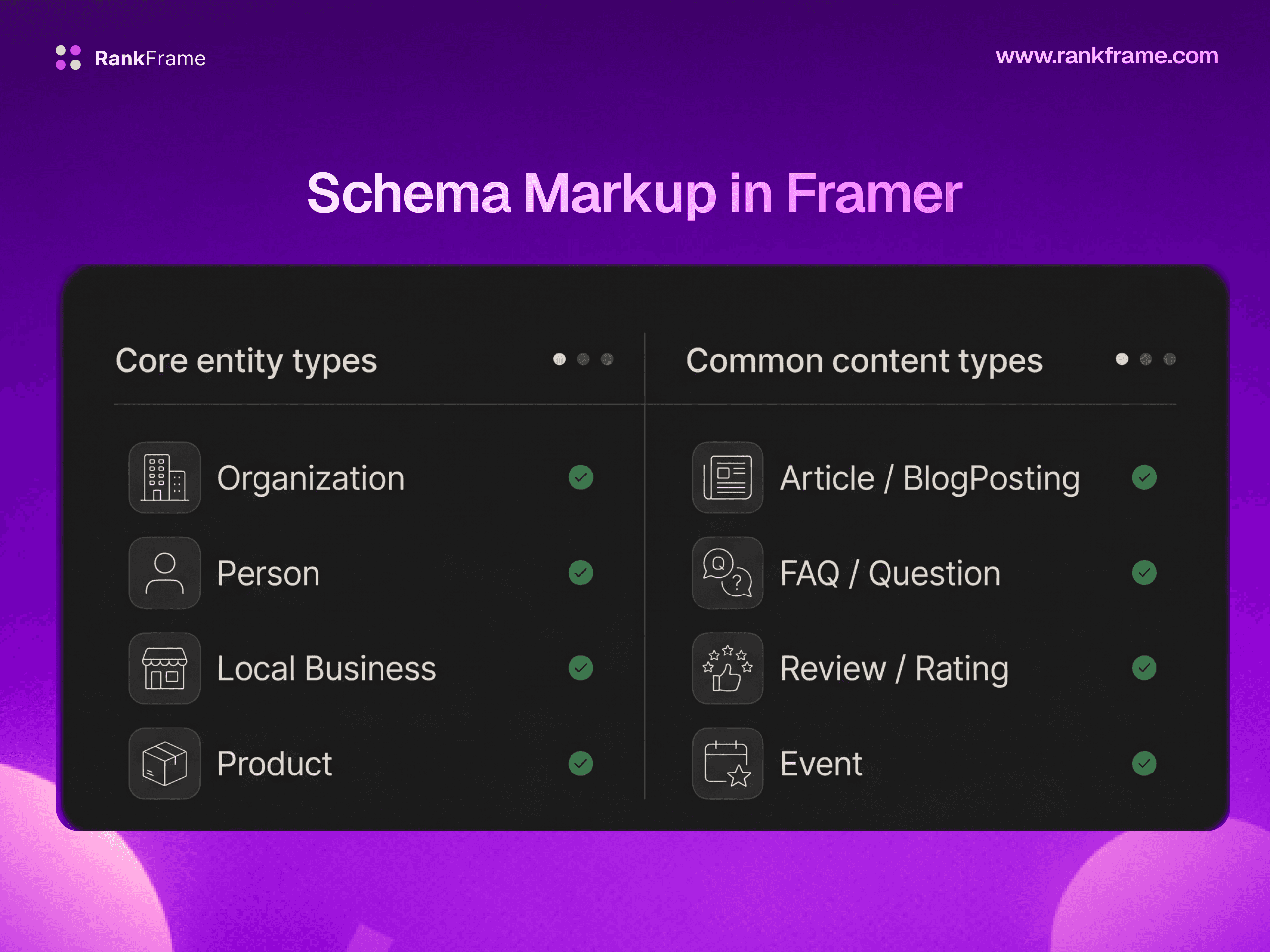
Option 2: RankFrame. RankFrame is the only Framer plugin that handles JSON-LD natively from inside the editor. You pick a schema type (Organization, Person, Article, Service, Restaurant, Book), fill out a guided form, and the plugin injects valid JSON-LD on publish. It is duplicate-safe, so if you accidentally add the same schema twice it will not double-print. It updates automatically on every republish, which means dates and content stay current. And it has an AI auto-generate option that drafts a complete schema from your existing site copy if you do not want to fill the form by hand.
For a single, static Organization schema, custom code is fine. For per-page Article schema, multi-page Service schemas, or any site you expect to grow, RankFrame removes the manual JSON juggling and keeps everything valid as your site evolves.
Schema and multi-language sites
Schema is currently generated per page rather than per locale, so one set of structured data applies across your site. Per-locale schema is part of the updated schema flow planned for Q3 2026.
Frequently asked questions
What does JSON-LD stand for?
JSON-LD stands for JavaScript Object Notation for Linked Data. JSON is the data format (the same lightweight format used for APIs and configuration files), and Linked Data refers to the practice of structuring data so that it can be connected to a shared vocabulary like schema.org and interpreted consistently across different systems.