
<- Go Back
Submit & Indexing
Instant Indexing Overview
RankFrame connects to the official Google Indexing API so you can push URLs directly to Google, rather than waiting days for Googlebot to find them. This article explains what Instant Indexing does, where to find it, and what each tab is for.
Last Updated on
Read Time
4 min read
What is Instant Indexing
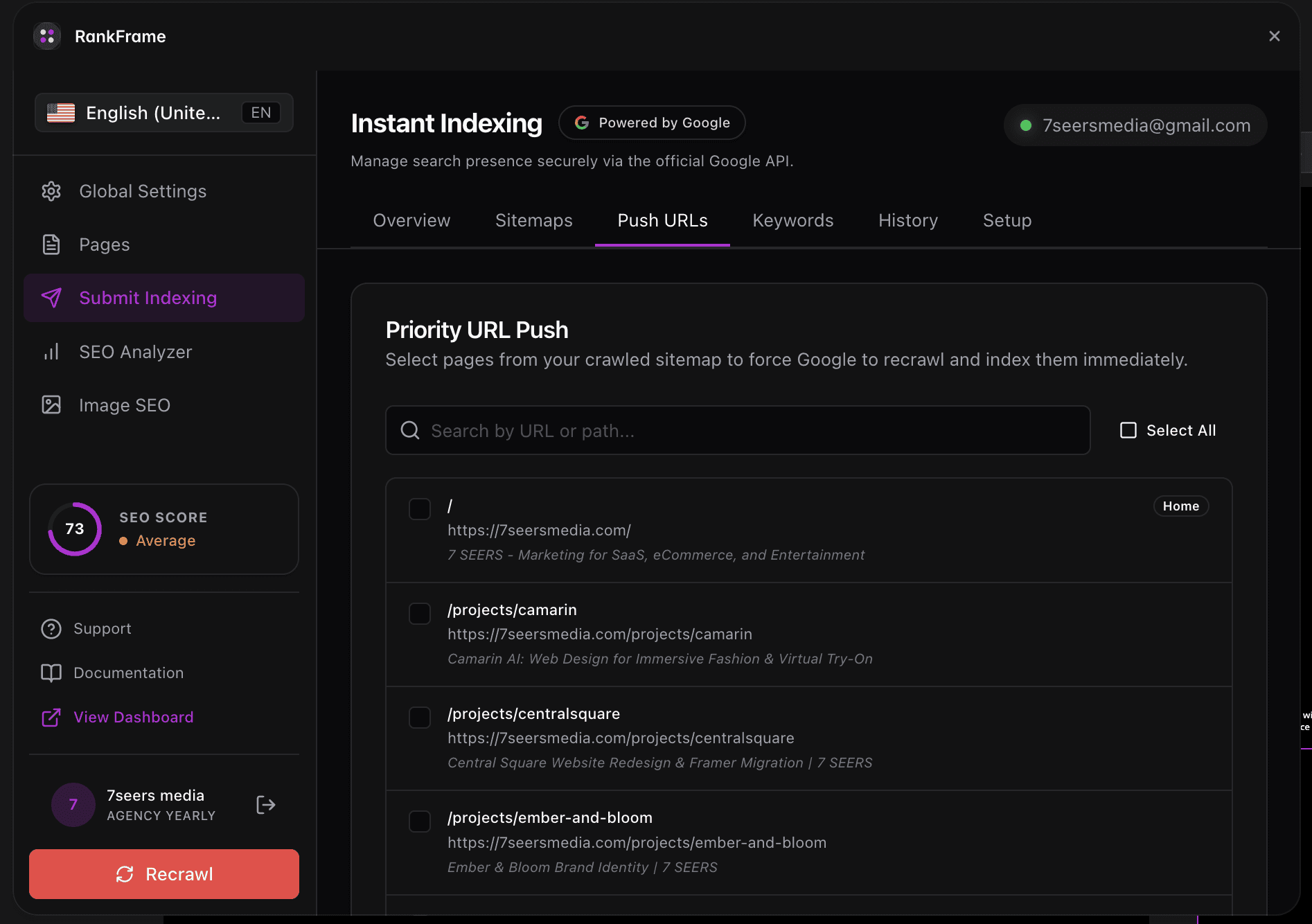
Instant Indexing is a feature inside RankFrame that lets you tell Google about your pages the moment they are ready. It uses the official Google Indexing API, the same authenticated channel that Google recommends for programmatic URL submissions.
You will find it in the Submit Indexing section of the plugin, identified by the lightning bolt icon in the left sidebar. The section header reads Instant Indexing and carries a Powered by Google badge. The subtitle reads: "Manage search presence securely via the official Google API."
Because RankFrame is a native Framer plugin by 7 Seers, the entire workflow stays inside Framer. You do not need to switch to Search Console or a separate third-party tool to submit URLs.
All requests go through your own Google account credentials. Google treats these authenticated signals as authoritative, which is why the API produces faster results than passive crawl discovery.
How to open Submit Indexing
The Submit Indexing panel is one click away from anywhere inside RankFrame.
Open RankFrame in Framer: Launch the plugin from the Framer toolbar. The left sidebar shows navigation icons for each section of the plugin.
Click the lightning bolt icon: The lightning bolt icon opens the Submit Indexing panel with five tabs across the top.
Select a tab: If this is your first visit, go to the Setup tab before anything else.
The five tabs
The Submit Indexing panel is organized into five tabs: Submit URLs, Analytics, Setup, Keyword Tracker, and Indexing History. Each tab covers a distinct part of the indexing workflow.
If you are using Submit Indexing for the first time, go to the Setup tab before touching anything else. The other tabs depend on a connected Google account.
Before you start
Instant Indexing requires a one-time authorization before you can submit any URLs. Without it, requests to Google will fail.
Open the Setup tab first. The tab walks you through connecting your Google account and granting RankFrame permission to call the Indexing API. Once that authorization is complete, your credentials are stored and every other tab becomes fully functional.
The Google account you connect must be a verified owner of the property in Google Search Console. If ownership is not verified, the API will reject your submissions.
After completing Setup, return to the Submit URLs tab to send your first request. You only need to go through Setup once. Future sessions reuse the saved authorization unless you revoke access or switch Google accounts.
Why instant indexing matters
By default, Google discovers new and updated pages by crawling your site on its own schedule. That process can take anywhere from a few days to several weeks depending on your domain authority and crawl budget.
The Google Indexing API gives you a direct line to Google's crawl queue. When you submit a URL through RankFrame, you send an authenticated request that tells Google to prioritize crawling that specific URL. The result is faster indexing, often within hours rather than weeks.
You publish time-sensitive content (product launches, announcements, blog posts) and want it indexed before the day is over.
You update an existing page (new pricing, changed copy, revised metadata) and need Google to reflect the current version quickly.
You have a large site where Googlebot may not re-crawl infrequently updated sections for weeks at a time.
Using the official API also means your submissions are authenticated and traceable. The Indexing History tab keeps a record of every request so you always know what has been submitted and when.
Combine Instant Indexing with RankFrame's schema injection. Submit a URL right after injecting its schema so Google indexes both the page content and the structured data at the same time.
Frequently asked questions
What is Instant Indexing in RankFrame?
Instant Indexing is the Submit Indexing section of RankFrame. It connects to the official Google Indexing API so you can push URLs directly to Google for crawling, instead of waiting for Googlebot to discover them on its own.