
<- Go Back
Page Speed
Page Speed in RankFrame: Where to Find It and Why It Matters
Overview of page speed measurement in RankFrame. Learn where to find speed data, how site-wide and per-page metrics differ, and why Core Web Vitals affect Framer site rankings.
Last Updated on
Read Time
3 min read
1. Where Site-Wide Speed Lives
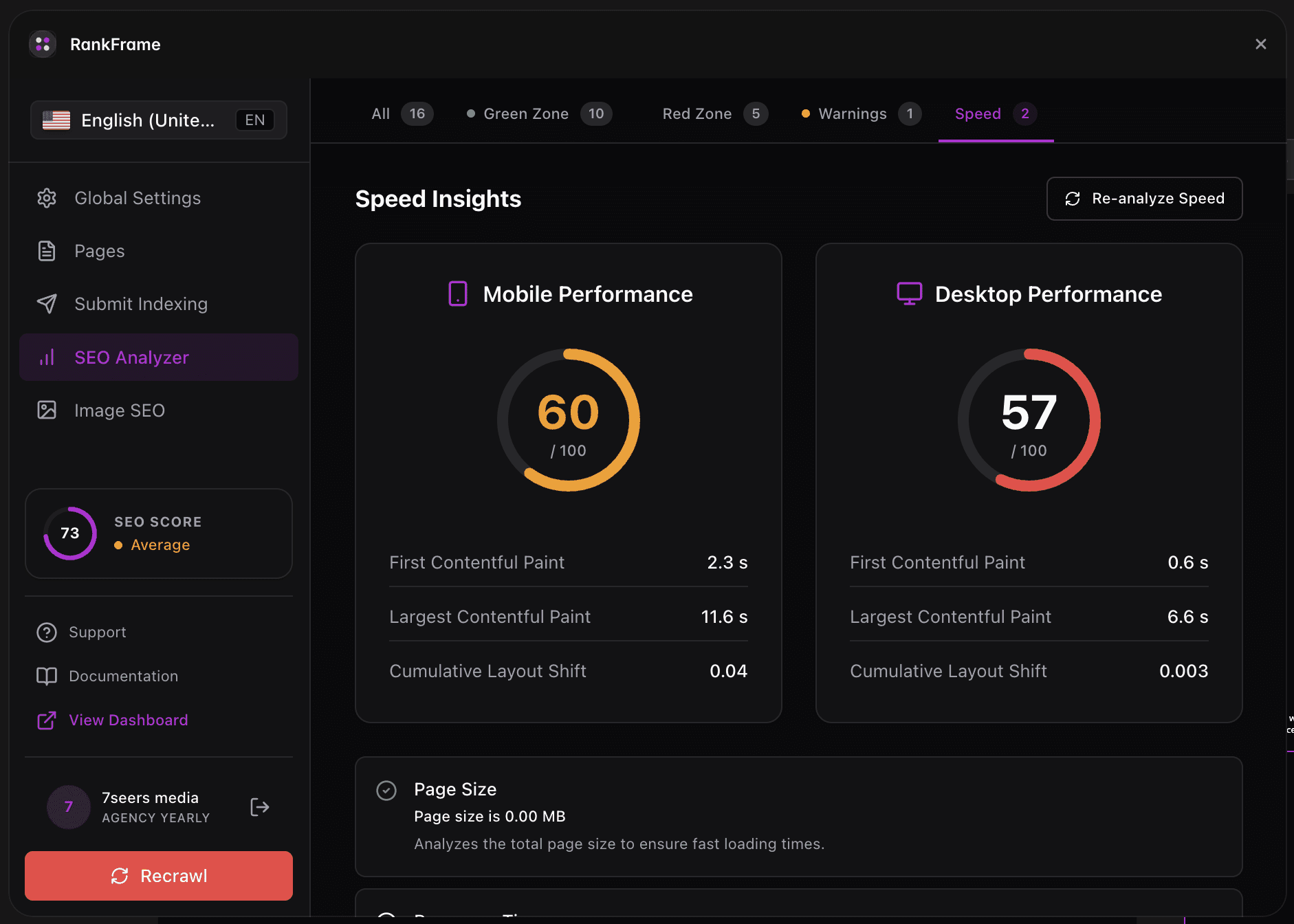
Open the SEO Analyzer (bar chart icon in left sidebar), then click the Speed tab. You see two large circular gauges (Mobile and Desktop), Core Web Vitals for each device, and a list of Speed Optimization Suggestions. Click Re-analyze Speed at any time to refresh the data.
2. Where Per-Page Speed Lives
Open any page from the Pages section, click Analyze, then open the Speed tab. You see Page Size, Mobile Speed, Page Objects, Response Time, and Image Headers Expire. These are scoped to the single page you have open.
3. Why Page Speed Matters for Framer Sites
Framer sites often look stunning but ship heavy hero images and animations by default. Without optimization, Largest Contentful Paint (LCP) can exceed 4 seconds on mobile. Google flags pages over 2.5s LCP as poor experiences and they rank lower. Faster pages also keep visitors longer: a 1 second delay can drop conversions by 7%.
4. Mobile vs Desktop
Mobile speed scores are almost always lower than desktop because mobile networks are slower and mobile CPUs are weaker. Google ranks pages based on mobile-first indexing, so the mobile score is the one that matters most for organic ranking. Aim for a mobile Performance score of 70+.
5. What “Live Lighthouse Data” Means
RankFrame queries Google PageSpeed Insights, which runs Lighthouse audits on Google’s servers. The data you see in RankFrame is the same data Google uses to rank your page. There is no estimated or simulated number: it is the real audit.
Site-Wide vs Per-Page Speed
Site-Wide Speed
Overview of the whole site
Mobile and Desktop gauges
Core Web Vitals per device
Refreshable via Re-analyze Speed
Per-Page Speed
Single page focus
Page Size, Page Objects, Response Time
Granular metrics per page
Refreshable from the page audit
Frequently asked questions
How often does RankFrame update page speed data?
Speed data refreshes when you click Re-analyze Speed in the SEO Analyzer or open a page audit fresh. Lighthouse can take 20 to 60 seconds per audit, which is normal.
Related to